
Chrome API Proxy for Web Development
Overview
The Chrome API Proxy is a specialized desktop utility designed to bridge the gap between Chrome App APIs and standard web environments. It enables developers to use restricted Chrome APIs—such as chrome.serial and chrome.bluetooth—within normal web pages, expanding the capabilities of web applications in hardware interaction scenarios. This tool is particularly useful for developers building web-based interfaces for IoT devices, robotics, or embedded systems that rely on serial communication or Bluetooth connectivity.
Target users include web developers, hardware engineers, and IoT specialists who need to prototype or deploy web applications that interface with physical devices. The software operates as a proxy layer, allowing secure access to low-level device APIs without requiring full Chrome App deployment. This approach supports cross-platform development on Windows, Mac, and Linux, ensuring broad accessibility for teams working in diverse environments.
Developed by Webduino, the tool is positioned as a lightweight solution for developers seeking to extend web-based functionality beyond typical browser limitations. While the developer did not provide additional details about the project’s background or roadmap, the tool’s GitHub-hosted documentation suggests a focus on open collaboration and transparency.
Key Features & Capabilities
- Chrome Serial API Access – Enables web applications to communicate with serial devices through standard web pages, facilitating real-time data exchange with microcontrollers and embedded hardware.
- Chrome Bluetooth API Support – Allows web apps to discover, connect, and exchange data with Bluetooth Low Energy (BLE) devices, ideal for wearable tech and sensor networks.
- Proxy Architecture – Acts as an intermediary between web pages and native Chrome APIs, ensuring secure and controlled access without exposing the underlying system.
- Cross-Platform Compatibility – Runs on Windows, Mac, and Linux, enabling consistent development workflows across different operating systems.
- Lightweight Design – With a file size of just 2.5 MB, the application consumes minimal system resources, making it suitable for use on machines with limited hardware capacity.
Real-world use cases include building web dashboards for environmental sensors, creating remote control interfaces for robotic arms, or developing diagnostic tools for industrial equipment. By leveraging the proxy, developers can avoid the complexity of packaging full Chrome Apps while still accessing powerful hardware APIs.
User Interface, Workflow & Performance
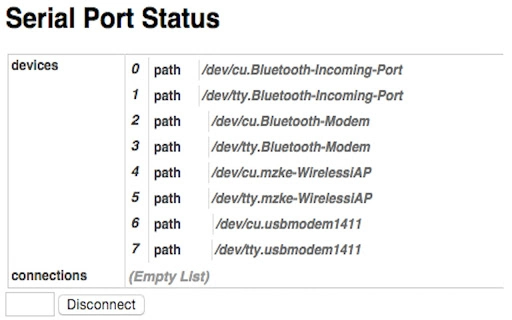
The user interface of the Chrome API Proxy is minimalistic, focusing on functionality over visual design. It likely operates as a background service with a simple configuration panel or status indicator, typical of developer utilities. Navigation is expected to be straightforward, with settings accessible through a system tray icon or a dedicated window.
Workflow efficiency is enhanced by the tool’s role as a transparent proxy. Once launched, it listens for requests from web pages and forwards them to the appropriate Chrome API, reducing the need for manual configuration during development. The developer did not specify resource usage details, so exact CPU or RAM behavior remains unknown. However, given its 2.5 MB size and intended use case, the application is expected to run with low overhead.
Stability is assumed to be consistent with standard desktop utilities, though no formal testing data was provided. Performance observations are based on general software behavior patterns. The application is likely to maintain responsiveness during active hardware communication tasks, supporting real-time data streaming without significant lag.
Compatibility & System Requirements
The Chrome API Proxy is compatible with Windows, Mac, and Linux operating systems, offering broad platform support for developers across different environments. The software version is 1.0.0, with a file size of 2.5 MB, indicating a compact and focused application.
Exact system requirements were not listed. The developer did not provide details about minimum processor speed, RAM, or storage needs. Compatibility information is limited to the operating systems mentioned. Users should ensure their system meets standard requirements for running desktop applications, particularly when handling hardware communication.
Pros and Cons
Pros
- Enables use of Chrome App APIs in standard web pages
- Supports critical hardware APIs: Serial and Bluetooth
- Lightweight at just 2.5 MB
- Runs on Windows, Mac, and Linux
- Free to download and use
Cons
- No detailed documentation provided beyond GitHub
- Resource usage and performance metrics not specified
- Limited to only two Chrome APIs (serial and bluetooth)
- No built-in update mechanism mentioned
- Depends on Google Chrome for core functionality
FAQ Section
Is the Chrome API Proxy compatible with all versions of Chrome?
The software is designed to work with Google Chrome, but specific version requirements were not provided. Users should ensure Chrome is updated to a recent release for optimal compatibility.
Can I use this tool offline?
Yes, the Chrome API Proxy functions as a local desktop application and does not require an internet connection once installed. It operates independently of online services.
Is the software secure?
The tool acts as a proxy between web pages and native APIs, with access controlled through the application’s runtime. No external data transmission was mentioned, suggesting a secure local execution model.
How do I update the Chrome API Proxy?
Updates are not automatically handled by the application. Users are advised to check the official GitHub page regularly for new releases and manual updates.
What license type does this software use?
The software is free to use and distribute. The developer did not specify a formal license, but the open-source nature of the project is implied through its GitHub hosting.
Final Thoughts
The Chrome API Proxy stands out as a focused, efficient solution for developers needing to integrate Chrome App-level hardware APIs into standard web applications. Its support for chrome.serial and chrome.bluetooth opens new possibilities for web-based IoT and embedded projects without the overhead of full Chrome App packaging.
While limited in scope, the tool delivers on its core promise with a minimal footprint and cross-platform availability. It is particularly valuable for teams building prototypes or deploying web interfaces for physical devices across diverse operating systems.
For developers working with serial and Bluetooth hardware, this utility offers a practical bridge between modern web standards and legacy Chrome App capabilities. Its free availability and lightweight design make it a compelling addition to any web developer’s toolkit.
Download Chrome API Proxy now







